> For the complete documentation index, see [llms.txt](https://obsrv.sunbird.org/llms.txt). Markdown versions of documentation pages are available by appending `.md` to page URLs; this page is available as [Markdown](https://obsrv.sunbird.org/core-concepts/high-level-architecture.md).
# High Level Architecture
Under the hood of Obsrv
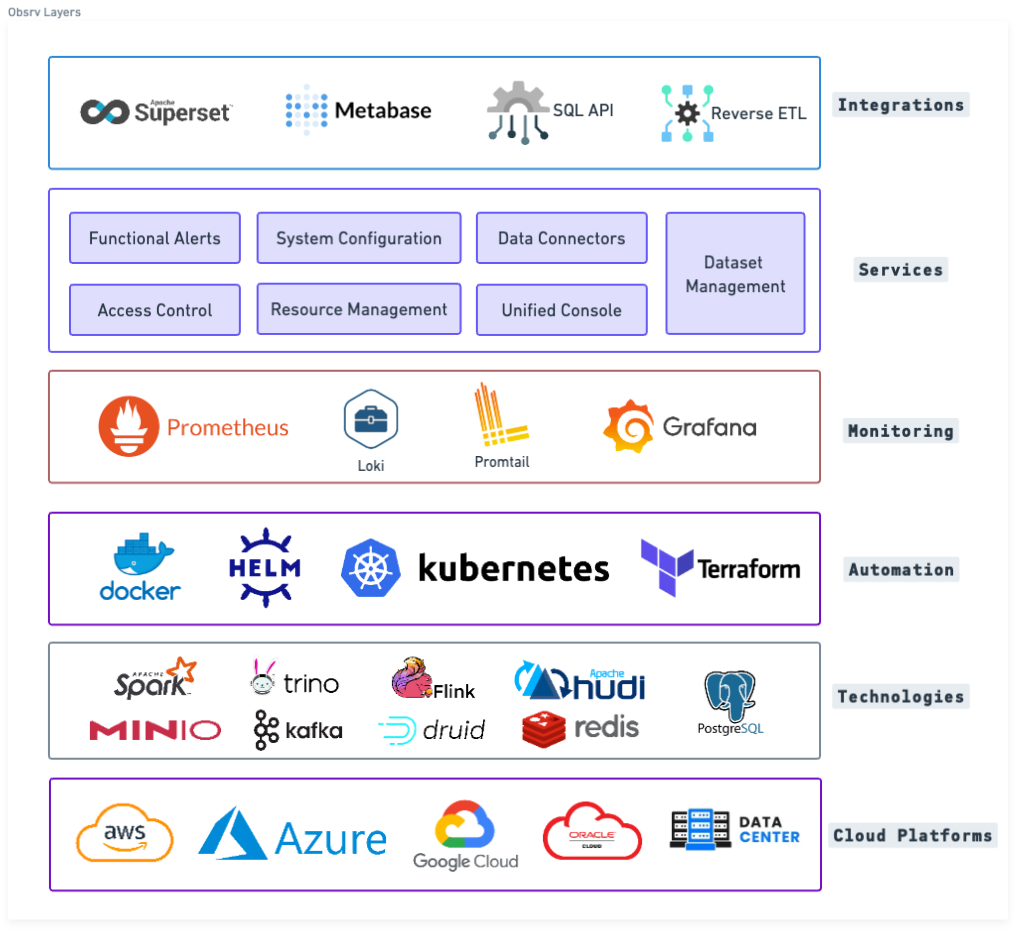
Obsrv fuses multiple technologies together with extreme automation and detailed monitoring coupled with intelligent services to work on any cloud to enable multiple data use-cases via decoupled integrations. The chaining together of these layers give Obsrv its scalability, reliability and efficiency.
Obsrv in a box - Fuse together multiple layers
Following diagram explains the high level architecture of the Obsrv data platform
Obsrv Data Platform
Following are the key components in Obsrv:
1. **Connectors:** A connector (that can be literally dropped in) has the ability to pull the data from any source either as a stream/event or batch. The connector framework of Obsrv allows one to develop a connector quickly within a couple of days using popular technologies like Apache Spark and Apache Flink and in the language of their choice - java/scala/python. By design the framework takes care of scaling and reliability of the connectors
2. **Data Pipeline:** Data pipelines are Apache Flink and Apache Spark based jobs that are designed to process data at real-time speed. The data pipeline of Obsrv is extremely elastic and scales from 1 cpu to many cpus with minimal configuration changes and is also customizable and/or extendable.
3. **Real-time OLAP Store:** If configured, all the data is persisted in a real-time OLAP store called Apache Druid that would drive all real-time use-cases.
4. **Data Lake and LakeHouse:** As a default configuration, all data is persisted into a data lake (like S3 object store) and a LakeHouse called Apache Hudi. The LakeHouse and data lake drive the exhaust, AI/ML queries, batch aggregate queries and reporting needs.
5. **Unified Query Engine:** The unified query engine component takes care of all data driven use-cases. It allows the user to query using JSON, SQL and Spark/Trino interfaces.
---
# Agent Instructions
This documentation is published with GitBook. GitBook is the documentation platform designed so that both humans and AI agents can read, navigate, and reason over technical content effectively. Learn more at gitbook.com.
## Querying This Documentation
If you need additional information that is not directly available in this page, you can query the documentation by asking a question.
Perform an HTTP GET request on the following URL with the `ask` and `goal` query parameters:
```
GET https://obsrv.sunbird.org/core-concepts/high-level-architecture.md?ask=&goal=
```
`ask` is the immediate question: it should be specific, self-contained, and written in natural language.
`goal` is what the user is ultimately trying to achieve, the reason they need the answer. Sharing it helps GitBook give you a better, more relevant answer. A goal is most helpful when it describes the outcome the user wants rather than restating the question. For example, with `ask=how do I create an API token`, a goal like `automate deployments from our CI pipeline` lets GitBook tailor the answer to that use case.
The response will contain a direct answer to the question and relevant excerpts and sources from the documentation.
Use this mechanism when the answer is not explicitly present in the current page, you need clarification or additional context, or you want to retrieve related documentation sections.